

























FIND RESOURCES FOR A PRODUCT
Start typing the name of the product and the available related resources will populate below.

Frequently Asked Questions
Are all of the same T8000 and T6000e Field Kit Options available with the ODV-2D?
All of the same T8000 and T6000e 4-inch Field kit Options are available for use with the ODV-2D. A newly designed cutter option is required for use with the ODV-2D option.
Are ink tanks refillable?
No, They are not, They are for one-time-use only.
Are Security Certificates supported?
Security Certificates are supported as part of the T8000 Enterprise Security Suite. The process for loading security certificates is described in the T8000 Administrator’s Manual.
Are the barcode dimension requirements for ODV-2D differ from ODV-1D?
Yes, the minimum X-Dimension supported for ODV-2D is 10-mils. As ODV-1D usually requires a shorter focal difference, and the ODV-1D specification supports down to 6.6-mils.
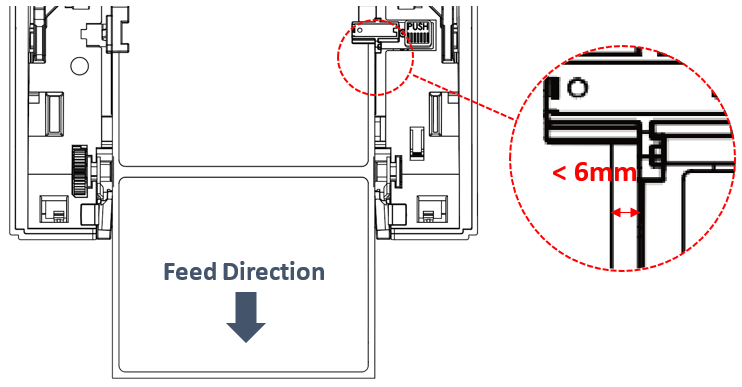
Are there any notes for the die-cut (gap media) supported by the TH series models?
Please note that the distance between the label and the backing paper (liner) on the right side must be less than 6mm.
Are TSC labels water-resistant?
Yes, TSC supports water-resistant labels - GHS compliant labels (IJP 600 series).
Can I buy labels or a color ink tank from resources other than TSC?
As for the label, the TSC color inkjet IJP series labels are highly recommended, are certified, and can meet the constant influx of new market demands. The ink tank only can be purchased from TSC.
Can I charge RE310 printer via power bank?
Yes. RE310 printer can be charged via power bank.
Can I clone the printer's configuration/Firmware or label format to other printers via USB drive in one step?
Yes, you can clone the printer's configuration, firmware or upload label style to a USB flash drive and specify the file name inside. Please contact TSC service center for more information.
Can I customize the logo on the main screen?
To customize the logo, please contact TSC for more information.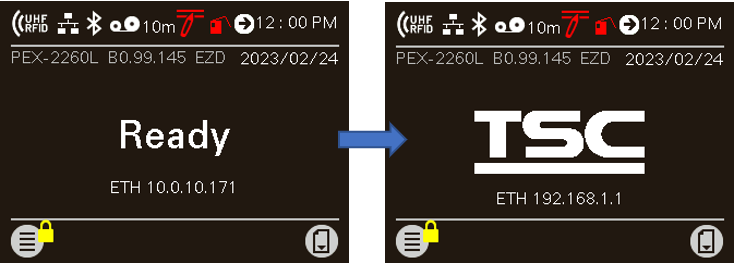
Can I do both direct and thermal transfer printing in RE310 printer?
No. The RE310 only supports direct-thermal printing.
Can I do both direct and thermal transfer printing in TDM printers?
No. The TDM is a direct-thermal only printer.
Can I do both direct and thermal transfer printing on Alpha-30L/40L printers?
No. The Alpha-30L/40L is a direct-thermal only printer.
Can I do both direct and thermal transfer printing on Alpha-30R printer?
No. The Alpha-30R printer is a direct-thermal only printer.
Can I do both direct and thermal transfer printing?
No. The M4L2 is a direct-thermal only printer.
Can I easily manage the printer remotely over the network?
Yes, you can open the browser and enter the IP address of the printer to go to the “Internal Embedded Webpage” to manage the printer. The “Internal Embedded Webpage” is a web UI (user interface) designed for one-on-one remote printer configuration management, monitoring and troubleshooting.
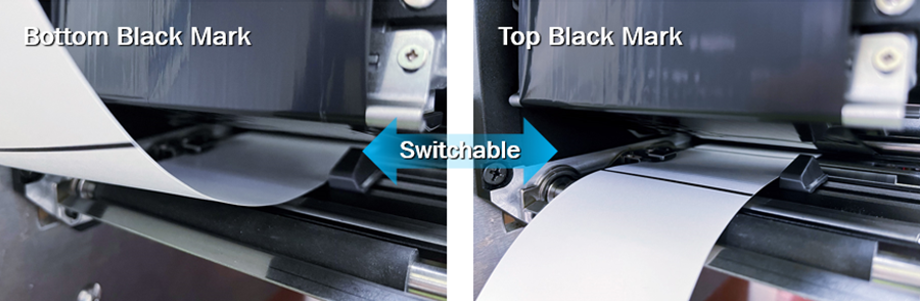
Can I print with labels that have black marks on the print side (black mark on the top side of the label)?
If you want to print with labels that have black marks on the print side, go to Sensor > Black Mark Location and then select Print Side. After finishing the setting, follow the steps described in the user manual to adjust the position of the top black mark sensor. Please refer to the PEX-2000 user manual for more information.
Can I replace the media drive module?
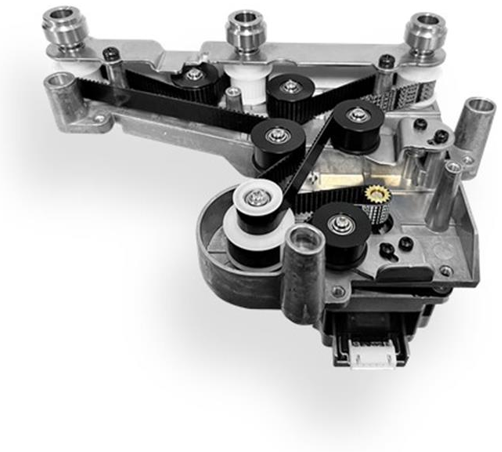
Yes. The partner can easily access the media drive module by just opening the rear cover. You can choose to replace the whole module or only the belt. The replacement takes no more than 15 minutes.
Can I rotate the printer's LCD display 180 degrees?
Yes, users are allowed to rotate the printer's display. The display can be set to 0 degrees (standard) or 180 degrees using the printer's setup menu.
To change the direction of the display, go to Menu > Advance > LCD Invert and then select Yes or No based on how you are going to use the printer.
Can I run both Ethernet and Wi-Fi?
The Wi-Fi printer can be configured for either Ethernet or Wi-Fi operation, but not both simultaneously. If an Ethernet cable is plugged in and connected with a host system, the Ethernet interface is active. In all other cases, the Wi-Fi is active.
Can I set my printer to automatically refresh its status everyday, such as at 6 o'clock in the morning?
Yes. You can establish rules using TSC Console Web so that your printer will execute what you have set up every time a condition is met. Conditions for a rule can be time-based or event-driven. You can set your printer to take an activity daily, weekly, monthly, or at a particular date/time.
Can I swap the printhead directly?
The printheads are interchangeable for all the available resolutions listed below. The printer can automatically detect the printhead change.
• 4-inch model: 203, 300 and 600 dpi
• 6-inch model: 203 and 300 dpi
Can I swap the printhead on the T4000 from 203 dpi to 300 dpi?
The printheads are interchangeable.
Can I swap the printhead on the T800 from 203 dpi to 300 dpi?
The printheads are interchangeable.
Can I swap the printhead on the T8000 from 203 dpi to 300 dpi?
Yes, the printheads are user replaceable and will automatically detect and accept when a user has changed from a 203 to a 300 dpi or vice-versa.
Can I update printer firmware remotely using TSC Console Web?
Yes, TSC Console Web enables users to update printer firmware remotely.
Can I upgrade a standard (non-RFID) T6000e to RFID?
It is possible to upgrade the T6000e 4in standard printer but with the internal antenna only and with limited backup and overstrike.
Can I upgrade my non-RFID T800 printer with RFID in the field?
It is a factory only option.
Can I upgrade my non-RFID TH240 printer with RFID in the field?
If you want to choose a built-in RFID inside the printer, it is only available as a factory option.
However, you can choose to purchase an external Tear-off RFID or Cutter RFID module to upgrade the TH240 with RFID functionality.
Can I upgrade my printer with W-Fi or Bluetooth in the field?
Yes! the W-Fi and Bluetooth options can be installed as field kits.
Can I upgrade my printer with W-Fi, GPIO and Parallel interface options in the field?
Yes! They can be installed as field kits.
Can I use my ODV-2D 4” on a T8000 6” printer?
No, the ODV-2D 4” has a different focal length and will not work on a T8000 6” and achieve a 6” scan width.
Can I use the printer while the battery pack is charging?
Yes. You can operate the printer while the battery pack is charging.
Can I use TSC Console Web to set up a reminder for printhead maintenance?
Yes, TSC Console Web allows users to set up a reminder for printhead maintenance and the printhead mileage can be displayed on the dashboard.
Can the 6” ODV-2D be attached to a T6000e?
No, not at this time.
Can the ODV-2D be sold as a kit that can be added to an existing installation?
Yes, the ODV-2D is available as a field kit and can be added to any 4-inch T8000 and T6000e printer. Only ODV-2D Certified Partners can purchase and install an ODV-2D field kit.
Can the ODV-2D work with 1D and 2D barcodes?
Yes, the ODV-2D can handle both 1D and 2D barcodes in any orientation, including picket fence and ladder barcodes. Some 2D barcodes may not be available at launch.
Can the printhead and platen roller be replaced by the end user on the Alpha-30L/40L?
No. Please return the Alpha-30L/Alpha-40L unit to the reseller and our team of experts will make these replacements for you.
Can the printhead and platen roller be replaced by the end user on the M4L2?
No. Please return the M4L2 unit to the depot, and our team of experts will make these replacements for you.
Can the printhead and platen roller be replaced by the end user on the RE310 mobile printer?
No. Please return the defective RE310 printer to your reseller and our team of experts will make these replacements for you.
Can the printhead and platen roller be replaced by the end user on the TDM Series mobile printers?
No. Please return the TDM unit to the reseller and our team of experts will make these replacements for you.
Can TSC Console Web be used over a USB connection to the printer?
No. TSC Console Web must be used through either a wireless or wired network. That is to say your printer must support either Wi-Fi or Ethernet interface if you want to manage the printer using TSC Console Web.
Did the printer model number change with this update? If not, how to I identify this later version?
There are no printer model number changes. You can identify the new model by the serial number which includes a V3 in the sequence (T6EV3##32#####). These units phased into production in March 2022.
Do all MB241 RFID series printers support thick RFID labels and tags?
Only the MB241 RFID printer with tear-off option supports thick RFID labels and tags (up to 1.65 mm thick).
Do I need a tool to replace the printhead on the T4000?
Yes, you need a screwdriver – the printhead is retained in place by a single screw. The screw is very accessible and easily removed.
Do I need a tool to replace the printhead on the T6000e?
No, the printhead replacement is a simple process that requires no tools.
Do I need a tool to replace the printhead on the T8000?
No tools are required.
Do I need a tool to replace the printhead on the T800?
You need a #1 Philips screwdriver to remove the printhead.
Does port 3007 (in charge of management) have priority over port 9100 (responsible for print activities)? Can they work simultaneously?
Both ports do not interfere with each other. They can work simultaneously.
Does Printronix Auto ID offer labels and ribbons for the T8000 Series?
Yes, the same labels and ribbons used on the T5000r ES Series printer are supported on the T8000.
Does Printronix Auto ID offer supplies for the T4000?
Printronix Auto ID has a complete printer supplies offering designed to work optimally with the T4000.
Does Printronix Auto ID offer supplies for the T6000e?
We carry a complete printer supplies offering designed to work optimally with the T6000e.
Does Printronix offer consumables for the T800?
Printronix Auto ID has a complete printer supplies offering designed to work optimally with the T800.
Does the M4L2 mobile thermal printer have Enterprise Level Wi-Fi security protocol and certification?
Yes…the M4L2 is certified for Wi-Fi 802.11 a/b/g/n, WEP, WPA, and WPA2, as well as Bluetooth V2.1, Class 2. Please check the product brochure for complete information.
Does the MB241 RFID printer support HF (High Frequency) RFID labels?
No. The MB241 RFID printer supports RFID labels and tags which are compliant with the UHF Gen2 (ISO18000-63) specifications.
Does the ODV-2D 6” have the same mechanical footprint as the ODV-2D 4”?
No, in order to support the full scan width the ODV-2D 6” mounts slightly higher and further out from the front of the printer.
Does the ODV-2D 6” work with the cutter?
No, it does not work with the cutter at this time.
Does the ODV-2D work at the same throughput speeds as the T8000 and T6000e?
No, the throughput speeds of the ODV-2D are highly dependent upon the setup and validation procedure options that are selected by the operator. In addition, label formats that have numerous barcodes with large data validation requirements will impact throughput speeds. However, the simplicity of setup, and operation of the ODV-2D provides significant advantages in the majority of applications. As a result, throughput speeds have not been an issue with initial installations. The Printronix Auto ID VAR partner is capable of evaluating your application to ensure that throughput speeds are optimized to meet your requirements.
Does the PEX-2000 series support micro labels?
Yes. You can use the front gap sensor to calibrate the micro label.
The printer's default gap media sensor setting is on the label holder cover (rear side of the printer), with the green media sensor LED. If you want to use the front gap sensor, go to Sensor > Gap Location and then select Front. You can refer to the PEX-2000 user manual for more information.
Does the PEX-2000 series support thick RFID labels/tags?
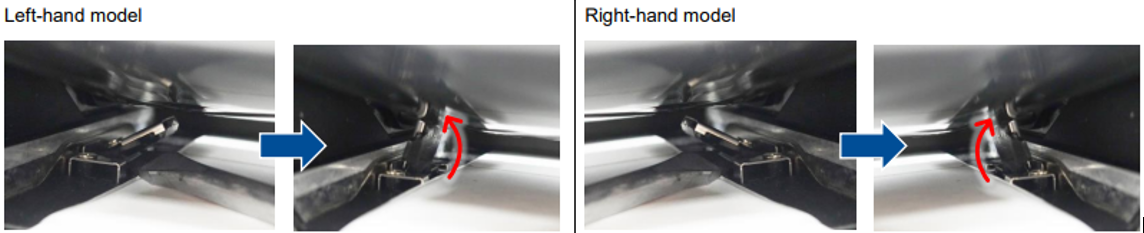
Yes. To install the thick media (0.9 mm - 1.2 mm), use a tool to lift up the front gap media sensor to facilitate the media installation.
Does the print performance degrade when operating on battery power compared to using an external power supply?
No, operating on battery power does not affect the print performance. The printer can still print at full speed, adjust print density, and work with optional accessories when running on battery power.
Does the RE310 printer support fast charging?
Yes. The RE310 printer supports fast charging, but please purchase a fast charging power adapter (PD 3.0, 18W or higher) separately from the market.
Does the T4000 support HF RFID labels?
The T4000 only supports UHF Gen2 (ISO18000-6C) RFID labels and tags.
Does the T6000e ODV-2D verify or validate barcodes?
The ODV-2D both verifies and validates barcodes as they are printed. The data printed on the label is validated to match the data sent from the host. The barcode is verified to comply with ISO standards.
Does the T6000e support HF RFID labels?
The T6000e only supports UHF EPCglobal Gen2 (ISO18000-63) RFID labels and tags.
Does the T8000 ODV-2D verify or validate barcodes?
The ODV-2D both verifies and validates barcodes as they are printed. The data printed on the label is validated to match the data sent from the host. The barcode is verified to comply with ISO standards.
Does the T8000 Wi-Fi support the latest security protocols?
The T8000 offers a full security suite including WEP 40/128bit, WPA Personal (TKIP) and WPA2 Personal (AES/CCMP). The Wi-Fi option also supports several Enterprise level authentication protocols, including EAP-PEAP, EAP-TTLS, PEAPv0/MS-CHAPv2, EAP-TLS) to ensure a secure enterprise environment.
Does TSC provide label design software which can generate bar code or text for CPX4 Series?
Yes, TSC provides the built-in software (BarTender UltraLite) which can generate the bar code, text or edit any label format.
How can I buy the Alpha-30L/40L printer?
To purchase a Alpha-30L/40L printer, buyers can contact their local TSC reseller, or contact us through our website.
How can I buy the Alpha-30R printer?
To purchase the Alpha-30R printer, buyers can contact their local TSC reseller, or contact us through our website.
How can I buy the RE310 printer?
To purchase a RE310 printer, buyers can contact the local TSC reseller, or contact us through our website.
How can I buy the TDM printer?
To purchase a TDM printer, buyers can contact their local TSC reseller, or contact us through our website.
How can I check the current status of the battery?
You can view the battery status on the LCD display or check it using the TSC Console or TSC Console Web.
How can I clean the glue residue for linerless printer?
Please see the How-to Video.
How can I get the linerless cleaning kit?
Please contact our regional sales representatives.
How do I access the real-time clock?
The Wi-Fi option card includes a real-time clock to support time-restricted certificates. In addition, it can also be used for printing time stamps on date coded labels.
How do I adjust for the best print quality?
A Print Quality Wizard under the Wizard Control Panel menu describes in detail how to obtain the best print quality.
How do I adjust my printing speed and density by TSC Console?
- Select the printer → Function → Printer Configuration → Get
- Adjust the value of Speed and Density then press Set to finish setup.
How do I calibrate the labels on my T4000 printer?
The control panel printer setup wizard provides an easy-to-follow calibration process. The Settings menu allows you to select the Gap/Mark sensor to match the type of media installed. In addition, you can set the printer to do an auto Calibrate at power up or when print station has been closed. In all cases the printer will advance a few labels and calibrate the sensors so that they will detect top-of-form.
How do I calibrate the labels on my T800 printer?
The control panel printer setup wizard provides an easy-to-follow calibration process. The Settings menu allows you to select the Gap/Mark sensor to match the type of media installed. In addition, you can set the printer to do an Auto Calibrate at power up or when the pivoting deck has opened and closed. In all cases the printer will advance a few labels and calibrate the sensors so that they will detect top-of-form.
How do I calibrate the labels on my T8000 printer?
Calibration is described in the Control Panel Printer Setup Wizard. Also, under the Settings menu you select the Gap/Mark sensor that matches the type of media installed and then select the Auto Calibrate option. In addition, you can set the printer to do an Auto Calibrate at power up and/or when the pivoting deck is opened and then closed. In all cases the printer will advance a few labels and calibrate the sensors so that they will detect TOF.
How do I configure and change the printer configuration using the control panel?
The T8000 icon-based control panel will guide you through the changes of configuration and settings of the printer. With the user-friendly step-by-step setup wizard, you can manage the printer settings easily. If you need more information, please refer to the User Manual.
How do I configure the T4000 RFID thermal Printer?
For loading media, ribbon, and label calibration, “How-to Videos” are available on the support section of our website, along with product manuals.
If you are familiar with the T6000 and T8000 you will instantly recognize that the control panel, keypad layout and menu structure are the same on the T4000.
How do I configure the T6000e?
For loading media, ribbon, and label calibration there is a media loading diagram in the media cover.
How do I configure the T8000 Wi-Fi option?
When the Wi-Fi option is installed, it can be configured through the Ethernet interface or the front panel menus. The T8000 features a full color display to simplify the setup and use of the printer. The Setup Wizard guides the operator through the printer setup, including Wi-Fi configuration.
How do I configure the T800?
For loading media, ribbon, and label calibration, “How-to Videos” are available on the support section of our website, along with manuals.
If you are familiar with the T6000 and T8000 you will instantly recognize that the control panel keypad layout and menu structure are the same on the T800.
How do I get the Bluetooth MAC address with the Communication Tool?
Please refer to the link HERE.
How do I load labels and ribbons into the printer?
T8000 printers are one of the easiest printers to load media and ribbon into. Both are side-loaded. A ribbon and media loading illustration is available in the User’s Setup Guide and on the inside of the media cover. Also, a Printer Setup Wizard in the control panel describes in detail how it’s done or if you prefer, you can go to our How-to Videos section.
How do I restore the printer back to factory defaults?
Use the front panel and select: Settings > Configs > Load Config > Factory.
How do I use BarTender to download files and print them via Bluetooth device?
Please refer to the link HERE.
How do intiate calibration?
Way 1: Use keypad on the printer or touch panel to find the function: Menu > Sensor > Calibration > Auto Calibration.
Way 2:TSC Console > Select the printer > Functions > Printer Configuration > Calibration.
How do you add new stock from Seagull driver?
Please refer to HERE.
How do you adjust print position?
Adjust print position by Diagnostic Tool. Please refer to HERE.
How do you adjust printout position by Seagull driver?
Adjust printout position by Seagull driver. Please refer to HERE.
How do you adjust tear position in BarTender?
Adjust tear position in BarTender. Please refer to HERE.
How do you adjust the print position for the ESC emulation firmware?
Adjust the print position for the ESC emulation firmware. Please refer to HERE.
How do you change languages on TSC Console?
TSC Console > Advanced > Preference > Language.
How do you change speed and density in BarTender?
Please refer to HERE.
How do you change the printer codepage?
Please refer to HERE.
How do you download a BMP/PCX file into the printer?
Download BMP file to printer by Diagnostic Tool. Please refer to HERE.
How do you update firmware by TSC Console?
- Click the checkbox to select the printer/printers.
- Click Tools > File Manager Tool to access File Manager page.
- Turn the file type into Firmware File.
- Press Browse to select firmware file.
- Press Download to update firmware.
How does the T6000e RFID encoding performance compare to our competitors?
We recently completed a test comparing the T6000e encoding speeds against our main competitor models. The T6000e performance exceeded the competition by 1.5 to 3.0 times. As such, the T6000e RFID printer provides a compelling performance advantage over competitor models.
How easy is it setup the T800 for different RFID labels?
The T800 has an RFID label calibration feature in the RFID menu which makes it very easy to setup the printer for different RFID labels. The calibration process feeds three labels to determine the optimal encoding position and power levels.
How easy is it setup the TH240 for different RFID labels?
The TH240 RFID printer has an RFID label calibration feature in the RFID menu which makes it very easy to setup the printer for different RFID labels. The calibration process feeds several labels to determine the optimal encoding position and power levels.
If you are using an internal RFID module, please refer to the "How to calibrate the RFID tags" video.
If you are using an external RFID module, please refer to the "Loading tags with external RFID module" video.
How easy is it to set up the MB241 RFID printer for different RFID labels?
The MB241 RFID printer features the RFID label calibration function which makes it easy to configure the printer for both standard RFID and on-metal RFID labels. The calibration process feeds 3 to 4 labels to determine the optimal encoding position and RF power levels.
How easy is it to set up the T4000 for different RFID labels?
The T4000 RFID printer has an RFID label calibration feature in the RFID menu which makes it very easy to set up the printer for both standard RFID and on-metal RFID labels. The calibration process feeds 3-4 labels to determine the optimal encoding position and RF power levels.
How easy is it to setup the T6000e for different RFID labels?
The T6000e RFID printer has an RFID label calibration feature in the RFID menu which makes it very easy to setup the printer for both standard RFID and on-metal RFID labels. The calibration process feeds 3-4 labels to determine the optimal encoding position and RF power levels.
How is the T4000 RFID thermal Printer positioned within the Printronix Auto ID thermal printer portfolio?
The T4000 is an entry-level industrial printer and bridges the gap between the T800 high-end desktop printer and the T6000 mid-range industrial printer. The common thread with all three printers, along with the Printronix T8000 high-end industrial printer, is the Printronix System Architecture (PSA) which provides a rich set of features and functions that can be used in a broad suite of thermal printing applications.
How is the T6000e positioned within the Printronix Auto ID thermal printer portfolio?
The T6000e is an enterprise-class mid-range industrial thermal printer for demanding, offering extensive features and capabilities, designed to meet the requirements of mission critical applications.
How is the T800 positioned within the Printronix Auto ID thermal printer portfolio?
The T800 is a ground-up design and positioned as a high-end desktop thermal printer. With the PSA capability, it complements the Printronix industrial-class products but in a compact, affordable model.
How is the T8000 Series positioned within the Printronix Auto ID industrial thermal printer portfolio?
The T8000 Series is the premier high-end industrial thermal printer for the most demanding mission critical manufacturing and distribution operations.
How long are the battery working hours on the Alpha-30L/40L?
It is very difficult to give the precise number of hours it will last as the usage of the printer varies based on applications. However, the Alpha-30L lasted more than 23.5 hours of printing receipts (One print every 2 minutes; 12.5% printing area; printing via Bluetooth) on a single battery charge; the Alpha-40L lasted more than 45 hours of printing receipts (One print every 2 minutes; 12.5% printing area; printing via Bluetooth) on a single battery charge.
How long are the battery working hours on the Alpha-30R?
It is very difficult to give the precise number of hours it will last as the usage of the printer varies based on applications. However, the Alpha-30R lasted more than 23.5 hours of printing receipts (One print every 2 minutes; 12.5% printing area; printing via Bluetooth) on a single battery charge.
How long are the battery working hours on the TDM Series?
It is very difficult to give the precise number of hours it will last as the usage of the printer varies based on applications. However, the TDM-30 lasted more than 42 hours of printing receipts on a single battery charge; the TDM-20 lasted more than 17 hours of printing receipts on a single battery charge.
How long will the printhead last on the T4000?
For Thermal Transfer applications: printheads are warranted 12 months from shipment or 1 million linear inches (whichever comes first). For Direct Thermal applications: printheads are warranted 180 days from shipment or 1 million linear inches (whichever comes first).
How long will the printhead last on the T6000e?
For Thermal Transfer applications: printheads are warranted 12 months from shipment or 1 million linear inches (whichever comes first). For Direct Thermal applications: printheads are warranted 180 days from shipment or 1 million linear inches (whichever comes first).
How long will the printhead last on the T800?
For Thermal Transfer applications: printheads are warranted 12 months from shipment or 1 million linear inches (whichever comes first). For Direct Thermal applications: printheads are warranted 180 days from shipment or 1 million linear inches (whichever comes first).
How many labels can CPX4 Series print per ink tank?
With high yield ink tank, CPX4 Series is capable of delivering considerably more printout amount compared to others in its class at market.
In general condition (Image:4x3" 1200dpi,100 sheets x 50job per day, 7.5% duty, manual cleaning is excluded), CPX4 Series can print:
CPX4D: Average 45,000 sheets per ink tank (C,M,Y,K)
CPX4P: Average 32,000 sheets per ink tank (C,M,Y,K)
How many printer configurations can I save for quick deployment?
Users are allowed to save up to 5 sets of different configuration for quick deployment.
How much does the Alpha-30L/40L printer weigh?
The Alpha-30L weighs a mere 745 g including the battery. The Alpha-40L weighs a mere 985 g including the battery.
How much does the Alpha-30R printer weigh?
The Alpha-30R weighs a mere 650 g including the battery.
How much does the M4L2 mobile thermal printer weigh?
The M4L2 weighs a mere 2.43 pounds (1.1 Kg.) – including the battery.
How much does the TDM printer weigh?
The TDM-30 weighs a mere 375 g including the battery. The TDM-20 weighs a mere 215 g including the battery.
How should I properly dispose of the battery?
Please dispose of the battery in accordance with local regulations.
How to change language on TSC Console?
- TSC Console → Advanced → Preference → Language
How to download the True Type Font to the printer.
1. Click the checkbox to select the printer/printers.
2. Click Tools > File Manager Tool to access File Manager page.
3. Turn the file type into True Type Font.
4. Press Browse to select the font file.
5. Press Download.
How to download the True Type Font to the printer?
- Click the checkbox to select the printer/printers.
- Click ToolsàFile Manager Tool option to access File Manager page.
- Turn the file type into True Type Font.
- Press Browse to select the font file.
- Press Download.
How to initialize the printer by TSC Console?
- TSC Console → Select the printer → Functions → Printer Configuration → Factory Default.
How to make calibration by TSC Console?
- TSC Console → Select the printer → Functions → Printer Configuration → Calibration.
How to update firmware by TSC Console?
- Click the checkbox to select the printer/printers.
- Click ToolsàFile Manager Tool to access File Manager page.
- Turn the file type into Firmware File.
- Press Browse to select firmware file.
- Press Download to update firmware.
How to use Printer Management to get alert log file?
Please refer to the link HERE.
How to use the built-in UTF-8 font printing?
Please set Codepage to UTF-8.
How to use TSC Console to download BMP Font to the printer?
- Click the checkbox to select the printer/printers.
- Click Tools → Bitmap Font Tool.
- Select font and set the size of it
- Press Download Font to download font to the printer
- Check Tool → File Manager Tool to see is it successfully imported.
How to use upper black mark sensor for DH series?
When the black mark is on the print side of the label, you can set the upper black mark sensor via the LCD menu or by referring to the SET BLINE PRINTSIDE command in the TSPL Programming Manual.
How wide a label will the ODV-2D 6” scan?
The ODV-2D 6” can scan labels up to 6.5” wide with barcodes in any location across the web (ignoring quiet zones etc).
I am currently using a printer from another brand. Can I replace it with the MB241 RFID printer and integrate it into my applications effortlessly at no additional expense?
The MB241 RFID printer supports both TSC and Zebra RFID printer commands, which makes it easy to integrate the MB241 RFID printer into the existing applications.
I am currently using a printer from one of your competitors. Can the T4000 replace my printer and plug-and-play without additional effort and cost?
The T4000 supports emulations for most major competitor printers; Zebra, Datamax, Sato, Toshiba TEC, Intermec, Avery Denison (Monarch), Eltron, CAB, and IER. These emulations have been used on multiple Printronix Auto ID products and proven to be very robust.
I am currently using a printer from one of your competitors. Can the T4000 RFID replace my printer and plug-and-play without additional effort and cost?
Apart from the Printronix PGL RFID command set, the T4000 RFID thermal Printer also supports RFID printer commands for Zebra, Sato, and Avery Denison (Monarch). This makes the T4000 RFID printer easy to integrate into existing applications.
I am currently using a printer from one of your competitors. Can the T6000e replace my printer and plug-and-play without additional effort and cost?
The T6000e supports emulations for most major competitor printers; Zebra, Datamax, Sato, Toshiba TEC, Intermec, Avery Denison (Monarch), Eltron, and IER. These emulations have been used on multiple Printronix products and proven to be very robust. No additional software needs to be purchased or loaded. The T6000e comes with these emulations already installed.
I am currently using a printer from one of your competitors. Can the T800 replace my printer and plug-and-play without additional effort and cost?
The T800 supports emulations for most major competitor printers; Zebra, Datamax, Sato, Toshiba Tec, Intermec, and more. These emulations have been used on multiple Printronix products and proven to be very robust.
I am currently using a printer from one of your competitors. Can the T8000 Series replace my printer and plug-and-play without additional effort and cost?
The T8000 supports emulations for most major competitor printers; Zebra, Datamax, Sato, Toshiba Tec, Intermec, and more.
I am currently using an RFID printer from one of your competitors. Can the T6000e RFID replace my printer and plug-and-play without additional effort and cost?
Apart from the Printronix PGL RFID command set, the T6000e RFID printer also supports RFID printer commands for Zebra, Sato, and Avery Denison (Monarch). This makes the T6000e RFID printer easy to integrate into existing applications. Check the printronixautoid.com website support section for the individual programming manuals which document the commands supported.
Apart from the Printronix PGL RFID command set, the T6000e RFID printer also supports RFID printer commands for Zebra, Sato, and Avery Denison (Monarch). This makes the T6000e RFID printer easy to integrate into existing applications.
If a customer has an original T6000e can he/she upgrade his printer?
We are not offering an upgrade kit.
If I have an existing T8000 can I add the Wi-Fi option?
Any T8000 Series printer that has a serial number that is 7T8V21605000 or higher, can be upgraded to include the Wi-Fi option. These printers were manufactured after the fifth week of 2016 and have upgraded components. The upgrade kit part number is 258637-901. Firmware Program Files version 1.21E or higher must be installed. Some of the older printers may also have serial numbers that include 7PTX8 within the number series. These units are dedicated Ethernet and cannot be upgraded to Wi-Fi.
If I need the RFID function for my application, do you offer any upgrade solution for my standard (non-RFID) MB241 printer?
TSC offers RFID upgrade kit for the standard (non-RFID) MB241 printer. The upgrade kit features overstrike backup limited to 1 inch.
If the ODV-2D 6” is not pre-mounted, does this mean that I need to be an ODV-2D certified partner to install it?
The alignment and calibration require a factory trained technician. Certified ODV-2D partners will be provided with the update procedure. The process is almost identical to setting up the ODV-2D 4”.
Is a ribbon core required on the take-up spool?
Yes, and it is supplied with the printer.
Is the Configuration Utility and Firmware between M4L and M4L2 the same?
No. The Configuration Utility and Firmware is not backward or forward compatible between the M4L and M4L2. Please make sure to download the latest and correct Configuration Utility and Firmware for the respective printer model.
Is the ODV-2D 6” available as a field kit?
Yes, a field installation upgrade kit is available.
Is the ODV-2D 6” available with a protective cover like the ODV-2D 4”?
No, a protective cover is not available at this time.
Is the ODV-2D available through Distribution sales channels?
To more closely monitor the installation of ODV-2D technology, units will only be available through our Value Added Resellers who have been ODV-2D Certified.
Is the ODV-2D fully integrated with the printer?
Yes. ODV-2D is fully integrated into the same footprint as the printer and is tied to the printer controller so data from the application can be passed to ODV-2D, the printer can overstrike and reprint a failed label without operator intervention, and the data from ODV-2D can be integrated into Print Network Enterprises reporting and monitoring capabilities.
Is the T6000 and T6000e software the same?
While the T6000e uses the same code base, the builds are different and are not backwards/forward compatible.
If someone tries to load the wrong code into either T6000 or T6000e the error will be detected, and process aborted.
Is the Wi-Fi 802.11ac functionality introduced with the ODV-2D available with other Printronix Auto ID printers?
Yes, the many advantages of 802.11ac functionality are available in the T8000 and T6000 models of printers. Typical W-Fi speeds are expected to improve 3x to 5x over older W-Fi versions.
Is there a feasible approach to adjust the printout color which differs from the original?
TSC provides the color matching service. Please contact the TSC service center for further assistance.
Is there a possibility of scuffing on labels when using ribbon saver mode?
Yes, scuffing may occur based on the combination of ribbon and label used. To prevent this, verify the combination before usage and select an appropriate ribbon.
Is there a price difference between the 4” ODV-2D and the 6” ODV-2D?
There is no price difference between the ODV-2D 4” version and the ODV-2D 6”.
Is there any way that I can reboot my printer and return to default settings?
Way 1: Printer > Menu > Advanced > Initialization.
Way 2: TSC Console > Select the printer > Functions > Printer Configuration > Factory Default.
Is this change on both the T6000e 4” and T6000e 6” RFID printers?
Yes, both models have been updated with these changes.
My applications require both Direct and Transfer printing method. Can the T8000 support both Direct and Transfer printing?
Yes, the printer comes configured to print for both Direct and Transfer printing.
Our company does not have a certified technician; can we still sell the ODV-2D 6”?
Yes, you can sell the ODV-2D 6” but you will need to sell with an installation contract so that we can arrange for a certified technician install it.
Previously, all ODV-2D 4” units were pre-mounted to the printer prior to shipment from the warehouse. Will the ODV-2D 6” also be pre-mounted?
No, the ODV-2D 6” will not be pre-mounted prior to shipment due to the larger mechanical profile and to ensure shipping integrity.
Regarding Linux, what is the supported architecture for TSC Console Web?
The compatible architecture for TSC Console Web is x86_64 only and the Linux OS distribution is Ubuntu 22.04 or above.
What accessories are available and interchangeable for the TH/DH series printers?
Accessory | TH220 Series | DH220 Series | TH240 Series | DH240 Series |
802.11 a/b/g/n/ac Wi-Fi with Bluetooth 5.0 combo module | V | V | ○ | |
Bluetooth 5.0 module | V | V | ○ | |
Peel-off module | ☆ | ○ | ||
Guillotine cutter (full and partial cut) | ☆ | ○ | ||
Care label cutter (full cut) | V | N/A | V | N/A |
Linerless with tear | N/A | V | N/A | V |
Linerless with cutter (full cut) | N/A | V | N/A | V |
10mm narrow media adaptor | V | ▲ | V | ▲ |
V: available; ○: available & interchangeable for 4-inch models; ☆: available & interchangeable for 2-inch models; ▲: available & interchangeable for 2-inch and 4-inch models; N/A: not available
What are the core features of the T8000 Wi-Fi?
The T8000 Wi-Fi supports dual band 802.11a/b/g/n with 2.4GHz and 5GHz bandwidth providing flexibility while operating in crowded RF environments.
What are the different width size models available with the T8000 Series?
The models are featured in 4, 6 and 8-inch widths, matching the current widths from the T5000r-ES Series.
What are the key benefits of the Alpha-30L/40L compared to the competition?
The Alpha-30L/40L printer has:
1) The long battery life
2) Offers Dual Antenna technology
3) Is drop-resistant up to 6-feet (8.2-feet with optional IP54 Case)
What are the key benefits of the Alpha-30R compared to the competition?
The Alpha-30R printer has:
1) Faster and rugged design for on the go printing
2) Easy remote printer management with SOTI Connect and TSC Console
3) Seamless mobility communication
4) Full line of accessories
5) Integrated software pack
What are the key benefits of the RE310 printer compared to the competitors?
The RE310 printer has:
- Big battery capacity (3080mAh) and long battery working hour
- Adjustable and toolless media holder
- Support wider media width: 20mm - 80mm (0.79" - 3.15") with liner
- The latest Bluetooth version 5.3 with faster transmission speed
- Support both Wi-Fi and Bluetooth combo
What are the key benefits of the TDM compared to the competition?
The TDM printer has:
1) The longest battery life in the market
2) Is the first in the industry to offer Dual Antenna technology
3) Is drop resistant up to 5.9-feet (8.2-feet with optional IP54 Case)
What are the on-metal tags used in my T4000?
On-metal tags (sometimes called metal-mount or anti-metal tags) are RFID tags that are designed to operate on items made of metal. The physical properties of metal serve to reflect RF signals and so a standard RFID label would be completely undetectable by an RFID reader. On-metal tags are typically constructed with a thin foam insulator to provide a space between the metal surface and the RFID inlay. On-metal tags are available in several constructions and the ones used with printers are typically up to 1mm thick due to the foam insulator. They also should include a “bridge” between the individual tags to ensure smooth transport through the print station.
What are the on-metal tags used in my T6000e?
On-metal tags (sometimes called metal-mount or anti-metal tags) are RFID tags that are designed to operate on devices made of metal. The physical properties of metal serve to reflect RF signals and so a standard RFID label would be completely undetectable by an RFID reader. On-metal tags are typically constructed with a thin foam insulator to provide a space between the metal surface and the RFID inlay. On-metal tags are available in several constructions and the ones used with printers are typically up to 1mm thick due to the foam insulator. They also should include a “bridge” between the individual tags to ensure smooth transport through the print station.
What are the on-metal tags?
On-metal tags (sometimes called metal-mount or anti-metal tags) are RFID tags that are designed to operate on items made of metal. The physical properties of metal serve to reflect RF signals. As a result, a standard RFID label would be completely undetectable by an RFID reader. On-metal tags are typically constructed with a thin foam insulator to provide a space between the metal surface and the RFID inlay. On-metal tags are available in several constructions and the ones used with printers are typically measuring 1 mm thick or more due to the foam insulator. They also should include a “bridge” between the individual tags to ensure smooth transport through the print station.
What are the primary target user environments for the T8000 Series thermal printer?
The T8000 Series its Powerful, Reliable, and Proven to withstand the harshest environments in any industrial or commercial settings. It is the perfect solution for any manufacturing, transportation & logistics, and retail distribution centers.
What are the RFID functions that the MB241 RFID printer supports?
The RFID functions that the MB241 RFID printer currently supports are: calibration, read and write, full or partial label overstrike (based on the label length) on RFID label when encountering encoding failures, and RFID label counter for tracking good and bad labels.
What are the standard and optional communication interface ports for the T4000?
Standard Interfaces are: Serial, USB host/device and Ethernet. Optional Interfaces are: Wireless 802.11 a/b/g/n/ac and Bluetooth 4.2.
What are the standard and optional communication interface ports for the T6000e?
Standard Interfaces: Serial, USB host/device and Ethernet. Optional Interfaces: Wireless 802.11 a/b/g/n/ac, GPIO, and parallel
What are the standard and optional communication interface ports for the T8000 Series?
Standard Interfaces are: RS-232 (9 pin), USB and Ethernet. Optional Interfaces are: Parallel IEEE1284, GPIO and Wireless 802.11 a/b/g/n.
What are the standard connectivity options with the Alpha-30L/40L printers?
The Alpha-30L/40L series is available as below: (Either one selected)
• Type C USB 2.0 high speed + MFi Bluetooth 5.0 + NFC tag
• Type C USB 2.0 high speed + Wi-Fi module + Bluetooth 4.2 + NFC tag
What are the standard connectivity options with the Alpha-30R printer?
The Alpha-30R is available as below: (Either one selected)
• Type C* USB 2.0 + MFi Bluetooth 5.0 + Passive NFC tag
• Type C* USB 2.0 + 802.11 a/b/g/n/ac with Bluetooth 4.2 + Passive NFC tag
* Type C is for communication only
What are the supported functions for printers featuring RFID?
Currently the supported RFID functions through TSC Console Web are: Calibration, Read, and Write.
What are the supported UI languages for TSC Console Web?
The UI for TSC Console Web is available in English, Traditional Chinese, Simplified Chinese, German, Danish, Spanish, Finnish, French, Italian, Japanese, Korean, Dutch, Norwegian, Portuguese, and Swedish.
What are the target applications for the T4000?
The T4000 attributes make it ideal for the following applications:
• Transportation and logistics: Shipping/receiving, cross-docking, pick and pack
• Manufacturing: Product / item labels, carton labels
• Retail: Apparel, durable goods, shelf labels
• Healthcare: Nursing stations, laboratories, pharmacy
What are the target applications for the T6000e?
The T6000 attributes make it ideal for various applications. The following are some representative examples:
• Supply Chain and Logistics: Carton/case/pallet labeling, cross-docking, shipping/receiving, pick and pack, asset tracking (RFID), barcode verification (ODV)
• Manufacturing: Product / item / totes / carton labeling, parts inventory tracking, asset management (RFID), barcode quality (ODV)
• Retail: Vendor supply chain inventory, apparel labeling / relabeling, shelf labels, retail item level tagging (RFID), compliance fine avoidance (ODV)
• Healthcare: Medical supply chain / product labeling, Laboratories / nursing stations, medical supplies / asset tracking (RFID), barcode quality (ODV)
• Food/Agriculture: Produce case and pallet labeling, Meat pack and carton labeling, Barcode quality (ODV)
• Service Yard: Pipe markers (On-metal RFID), Cable markers (On-metal RFID)
What are the target applications for the T800?
There are a wide variety of applications and markets for desktop printers. The T800 will focus on end user applications that require the reliability and functionality of a Printronix Auto ID Printer:
• Transportation and logistics: Shipping/receiving, cross-docking, pick and pack
• Manufacturing: Product / item labels, carton labels
• Retail: Apparel, durable goods, shelf labels
• Healthcare: Nursing stations, laboratories, pharmacy
What barcode formats can be detected?
The ODV-2D can handle the full suite of 1D barcodes (Code 39 CODABAR Interleafed 2 of 5 Code 93 Code 128 UPC/EAN plus add-ons PDF417 (Limited) For 2D barcodes, the printer is currently able to handle DataMatrix and PDF417. QR codes, PDF417 Micro, PDF417 Truncated barcodes are under development and test. We will let you know as soon as they are available. Please check the Specification section on the Printronix Auto ID website for ODV-2D for the latest status.
What can I do if there is a compression/stretch problem with the printed content?
There is a vertical DPI adjustment function in the LCD “Advanced” menu list of the printer settings. It can be easily adjusted by enabling the “Vertical Length Adjustment” function and entering a percentage range between 90% and 115%.
What configurations are available on the T4000?
The T4000 is available in two configurations, Non-RFID and RFID. Both are available with either a 203dpi or 300dpi printhead and comes standard with Ethernet, USB Device / Host, and serial.
What configurations are available on the T800?
There are two configurations – non-RFID and RFID. Both can be ordered with either 203 dpi or 300 dpi printheads. All configurations come standard with Ethernet, USB Device 2.0, USB Host 2.0, and serial.
What do the icons represent on the control panel?
Each of the specific icons on the control panel represents a setting, function, or feature of the printer.
What has changed in the printer to accomplish this?
To allow thicker tags to move through the print station, several design changes were made:
1. An upgrade gap sensor assembly
2. Changes to the media guide configuration
3. The external antenna assembly was modified
What has changed on the T6000e RFID printer regarding on-metal tag support?
The original T6000e supported on-metal tags up to 1.2mm thick while the mainstream on-metal RFID tag market has settled on thicknesses ranging from 1.0mm to 1.5mm. To support the mainstream tag market we have re-designed the printer to support on-metal tags up to 2.2mm.
What is Dual Antenna technology and why?
A dual W-Fi antenna is a pair of identical antennas on the printer intended to increase the W-Fi performance by eliminating signal fading and dead spots. This principle known as antenna diversity, offers the ability to use two different reference points for signal reception and transmission, switching back and forth to the better one. A dual antenna on the printer device offers a solution to the problem associated with W-Fi fading, dead spots, and drop-outs experienced by single antennas devices. If for instance, one of the antennas falls out of line of sight or dead spot, the printer automatically switches to the other antenna. The printer’s W-Fi system will constantly monitors the signal strengths of both antenna and automatically uses the stronger of the two.
What is or are the standard connectivity with the M4L2 mobile printer?
The M4L2 is available with USB and W-Fi 802.11a/b/g/n or USB and Bluetooth V2.1 connectivity.
What is or are the standard connectivity with the TDM series?
The TDM series is available as below: (Either one selected)
• USB 2.0 + MFi Bluetooth 5.0 + Passive NFC tag
• USB 2.0 + 802.11 a/b/g/n Wi-Fi with Bluetooth 4.2 + Passive NFC tag
Note: 802.11 a/b/g/n Wi-Fi will be ready soon.
What is the advantage of the T8000 with Wi-Fi?
The T8000 Series is known for its ability to print high volumes in some of the most challenging work environments. The Wi-Fi option dramatically improves versatility by bringing the T8000 directly to the “point-of-need” by eliminating the limitations of hardwired connections.
What is the average and maximum recommended print volume from the T8000 Series thermal printer? How many labels per day?
The T8000 is designed to stand 24/7 operations, if properly maintained. The recommended label usage per day is 15,000 labels/day.
What is the benefit of having PostScript/PDF printer command language?
The major benefit of having a PostScript/PDF printer command language is the ability to affordably and easily replace costly laser printers.
What is the blinking LED light on top of the control panel?
The light is a status indicator that allows a user to see from a distance whether the printer is Online ready to receive print data (solid light), Offline with no fault (no light) or at Fault (blinking light). Common faults include Paper Out or Ribbon Out.
What is the difference between the factory option (MB241 RFID with tear/cutter) and dealer option (RFID upgrade kit)?
The dealer option supports 1-inch overstrike backup while the factory option supports 6-inch overstrike backup.
What is the estimated cost to print a color label via CPX4 Series?
It depends upon the color label size and design. TSC provides a cost calculation service which can estimate the approximate cost for best ROI. Please contact TSC service center for further assistance.
What is the limitation of the media unwind and rewind force users should note?
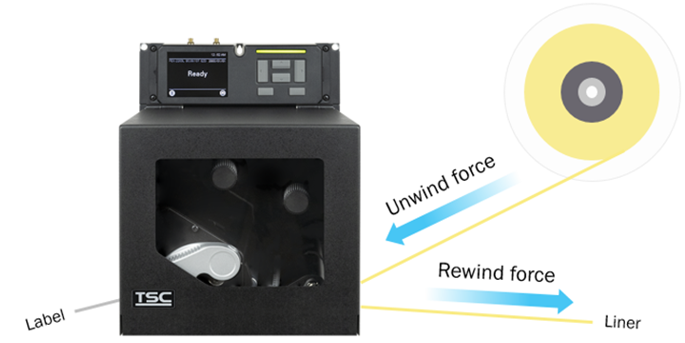
Media Unwind Force:
- In Peel Mode (with liner drawn by the peel roller): Applicator media supply steady state tension must be uniform and not exceed 940g (2.0 lbs.) Start/Stop tension transients must not exceed 1840g (4.0 lbs).
- In Tear Mode (media feed without peeling): Media tension not exceed 400g (0.88 lb).
Media Rewind Force:
- In Peel Mode (with liner drawn by the peel roller): Applicator media take-up pull tension must be uniform and not exceed 1840g (4.0 lbs).
What is the maximum number of labels that can be printed on a fully charged battery?
On a single charge, the high-capacity 4,000mAh (86Wh) battery can power the printer to print labels with a total length up to 40,000 inches*.
NOTE: Please note that the actual total print length may vary according to operational conditions and usage patterns.
What is the minimum X-dimension that is supported by the ODV-2D 6”?
The ODV-2D 6” can scan barcodes with a 15mil X-dimension up to 60mils.
What is the standard warranty for my Alpha-30L/40L?
The Alpha-30L/40L has a 2 Year Parts (excluding print head and platen roller) and Labor (Return to Factory) standard manufacturer warranty. You can purchase the Service Option warranty that adds up to three years to your printer's original coverage within 30 days of your initial barcode printer purchase.
What is the standard warranty for my M4L2?
The M4L2 has a 1 Year Parts and Labor (Return to Factory) standard manufacturer warranty. Additional 1 Year or 2 Year Service Maintenance agreements are available for purchase.
What is the standard warranty for my TDM?
The TDM has a 2 Year Parts (excluding print head and platen roller) and Labor (Return to Factory) standard manufacturer warranty. You can purchase the Service Option warranty that adds up to three years to your printer's original coverage within 30 days of your initial barcode printer purchase.
What is the warranty on the MB241 RFID printer?
The MB241 RFID comes standard with a 1-year factory warranty. Extended warranty packages are available. Please contact your TSC Territory Account Manager for more information.
What is the warranty on the T4000 RFID thermal Printer?
The T4000 comes standard with a 1-Year Return to Depot warranty. Extended warranty packages are available. Please contact your Printronix Auto ID Territory Account Manager for more information.
What is the warranty on the T8000 printer?
The T8000 comes standard with a 1-Year Return to Depot warranty. Extended warranty and service packages are available.
What is/are the key benefit/s of the M4L2 compared to the competition?
The Printronix Auto ID M4L2 printer has the longest battery life in the market, first in the industry to offer Dual Antenna technology, drop resistant up to 5-feet (6-feet with optional IP54 Case), and an impressive 2.65-inch label capacity for ultimate efficiency.
What options and accessories are available with the T8000 Series?
The T8000 Series offers a number of options and accessories from media handling to communication interfaces. All offered options and accessories can be found on our website.
What options are available for the MB241 RFID printer?
There are two host interface options: W-Fi 802.11a/b/g/n/ac and Bluetooth 5.0, and two media handling options: tear and cutter. The RFID printer comes with the standard Tear feature, or an optional Cutter. All options are available as a factory and dealer option. The field installation requires a trained technician.
What options are available with the T4000 RFID thermal Printer?
There are two host interface options: W-Fi 802.11a/b/g/n/ac and Bluetooth 4.2, and two media handling options: peel/rewind (partial roll rewind) and cutter.
The RFID printer comes with the standard Tear feature, or an optional Cutter.
All options are available as a factory and field option. The field installation requires a trained technician.
What options are available with the T800?
There are two host interface options: W-Fi 802.11a/b/g/n/ac and Bluetooth 4.2.
Both peeler and cutter options are available as both a factory and field kits.
What printer languages does the Alpha-30L/40L support?
The Alpha-30L/40L supports TSPL-EZC (EPL2, ZPL2, CPCL), or ESC-POS emulation printer languages.
What printer languages does the Alpha-30R support?
The Alpha-30R supports TSPL-EZC (EPL2, ZPL2, CPCL), or ESC-POS emulation printer languages.
What printer languages does the M4L2 support?
The M4L2 supports both ZGL II and CPCL printer languages.
What printer languages does the RE310 support?
The RE310 supports TSPL-EZ (EPL2 and ZPL emulations) ESC-POS, CPCL emulation printer languages.
What printer languages does the TDM Series support?
The TDM series supports TSPL-EZ (EPL2 and ZPL emulations) ESC-POS, CPCL emulation printer languages.
What RFID labels are supported on the T4000?
The T4000 supports a wide range of standard UHF RFID labels and On-Metal RFID tags. We can provide you with a list of validated labels and tags. This list is constantly undated as new RFID inlays and tags become available on the market and are validated on Printronix Auto ID printers in the RFID Label and Tag test lab.
What RFID labels are supported on the T6000e?
The T6000e supports a wide range of standard UHF EPCglobal Gen2 RFID labels and On-Metal RFID tags. We can provide you with a list of validated labels and tags. This list is constantly undated as new RFID inlays and tags become available on the market and are validated on Printronix Auto ID printers in the RFID Label and Tag test lab.
What RFID labels are supported?
The T800 supports a wide range of UHF inlays and labels. Check the support section of our website for a sample listing.
What RFID labels are supported?
The TH240 supports a wide range of UHF inlays and labels. Check the support section of our website for a sample listing.
What sets the T4000 apart from other brands of entry-level industrial thermal barcode printers in the market?
The T4000 is targeted for enterprise applications that demand high productivity, adaptability, and dependability in a compact footprint.
• Productivity: The fast ARM Cortex microprocessor enables fast first label print and high print speed at up to 8ips, making the T4000 one of the most productive entry-level industrial printers available.
• Adaptability: With the large competitor printer emulation suite, extensive communication capability, and small footprint, the T4000 adapts to a wide range of applications.
• Dependability: The metal frame construction, wide temperature operating range, and high MTBF assures the T4000 to be a dependable and durable thermal printer.
What sets the T6000e apart from other brands of midrange industrial thermal barcode printers on the market?
T6000e sets a new standard for productivity and versatility where speed, exceptional print quality and advanced features such as RFID are needed. The T6000e was designed and tested to a high mean time between failure (MTBF) standard, continuing Printronix Auto ID's reputation for offering high reliability products.
What sets the T800 apart from other desktop thermal barcode printers in the market?
The T800 is targeted for enterprise applications that demand high productivity, flexibility, and dependability
• Productivity: High speed, long ribbons, and easy use makes the T800 one of the most productive desktop printers available.
• Versatility: Compact design, large emulation suite, extensive interfaces, and flexible RFID enables a diverse set of applications.
• Dependability: Rugged double-wall clamshell construction withstands demanding printing environments.
What sets the T8000 apart from other thermal barcode printers in the market?
The T8000 Series offers unmatched industrial performance, ease of use, and 100% verifiable output. Rugged design and the industry leading ability to print PostScript/PDF, and sub-zero temperatures features without heating enclosures make the T8000 printer the smart choice for all industrial thermal printing.
What should I know before using printer to print the labels?
- Let computer detects the printer or manually install the driver first.
- Make sure the printer is power on and connected. (wired connection user)
What should I know before using the printer to print the labels?
1. Let your computer detect the printer or manually install the driver first.
2. Make sure the printer is powered on and connected. (wired connection user)
What type of charger should be used to charge the battery module?
Use the 90W power adapter supplied with the TH240 or DH240 printers, or the 60W power adapter supplied with the TH220 or DH220 printers to charge the battery. Do not use non-TSC power adapters to charge the battery pack, as it may damage the battery.
When using the power adapter supplied by TSC, the battery pack can be fully charged in approximately four hours under normal ambient temperatures.
What types and size labels can be printed?
The M4L2 support a wide range of label types and label sizes. It can also print on receipt papers, Die-Cut, Roll-Fed or Fan-fold. The M4L2 support label width from Min. 2-inch (50.8mm) to up to 4.4-inch (110mm); and media length from 0.5-inch (12.7mm) to 90.0-inch (2,286mm).
What types of label can the TDM print?
The TDM supports a wide range of label types. It can print on receipt papers, Die-Cut, receipt paper with black mark (in printing side or in non-printing side).
What types of labels can the Alpha-30L/40L print?
The Alpha-30L/40L supports a wide range of label types. It can print on die-cut, black mark, receipt, fan-fold, linerless and continuous (outside wound).
What types of labels can the Alpha-30R print?
- For Basic model, supports receipt paper, receipt paper with black mark in printing side, selected label, linerless (outside wound)
- For Premium model, supports receipt paper, receipt paper with black mark in printing side or backside, label, linerless (outside wound)
What types of media can the RE310 print?
The RE310 printer supports a wide range of label types. It can print on receipt papers, Die-Cut, receipt paper with black mark (in printing side or back side).
What types of on-metal tags are supported on the MB241 RFID printer?
Unlike most other RFID printers on the market today, the MB241 RFID with tear-off option is designed to support a variety of on-metal tags up to 1.65 mm thick.
What types of on-metal tags are supported on the T4000 RFID thermal Printer?
Unlike most thermal printers on the market today, the T4000 was designed from the ground up to support a variety of on-metal tags up to 1.2-mm thick.
What types of on-metal tags are supported on the T6000e?
Unlike most thermal printers on the market today, the T6000e was designed from the ground up to support a variety of on-metal tags up to 1.2mm thick. Printronix posts a list of validated on-metal tags on the RFID Support page of printronixautoid.com website. This is constantly undated as new tags become available on the market and are validated on our printers in our RFID Label and Tag test lab.
What types of RFID labels can be used on the MB241 RFID printer?
The MB241 RFID printer supports a wide range of standard UHF (Ultra High Frequency) RFID labels and On-Metal RFID tags. We can provide you with a list of validated labels and tags. This list is constantly undated as new RFID inlays and tags become available on the market and are validated by TSC.
When does the battery pack need to be replaced?
- The battery is not functioning properly.
- The battery exhibits visible physical damage.
- The battery has undergone over 550 charge cycles.
- The battery can only hold less than 80% of its original capacity.\
- The battery discharges too quickly.
- Fully charging the battery is taking longer than expected.
When mounted to a T6000e or T8000, the ODV-2D 4” can support print speeds up to 8ips. What is the maximum print speed with the ODV-2D 6”?
The T8000 with ODV-2D 6” can support print speeds up to 8ips. The speed may vary depending on the number of barcodes on the label.
When should I clean my linerless printer?
After you print 1km or whenever there is any glue residue or dust on the media route. Use the linerless cleaning kit to clean following parts:
- Cutter blade (For Linerless cutter kit option)
- Print head
- Linerless platen roller
- Media path
- Media sensors
For more information, please refer to the How-to Video.
Which port is used for TSC Console Web to connect to and manage printers?
The management commands are transmitted/received through port 3007.
Which printer does the ODV-2D 6” attach to?
The ODV-2D 6” attaches to the 203dpi or 300dpi versions of the T8000 6in printer.
Which printer series/models are supported by the BP-4000 smart battery station?
At present, the BP-4000 smart battery station is compatible with the following printer series/models: TH240, DH240, TH220, and DH220. Please note that the DH220E printer is not equipped with a USB host port. As a result, the BP-4000 smart battery station cannot support the DH220E printer.
Why are installation and service costs for the ODV-2D higher than the ODV-1D?
The ODV-2D option is a state-of-the-art image capture technology that is more versatile and complex than the ODV-1D. As a result, more time is allowed for both installing and servicing the ODV-2D to precisely calibrate the printer to match high levels of performance and production.
Why can't the driver wizard find my device? (USB interface)
1. Switch off the power and turn on again. 2. Computer might have detected the device already.
Why can't the printer detect the media type after calibration?
1. Media should be loaded and located correctly before calibration (check if the media is above the sensor) 2. Wrong media type might have been used.
Why can’t I use printer through Ethernet?
- Please make sure the Ethernet cable and the printer are well connected and lights are flashing.
Why can’t I use printer through Ethernet?
Please make sure the Ethernet cable and the printer are well connected and lights are flashing.
Why does my printer’s ribbon rewind spindle not spin?
- Way 1: Restart the printer again.
- Way 2: Load the ribbon rewind spindle correctly, and make sure it’s in correct direction.
Why is my Bartender unable to print the label?
1. Check that the printer is powered on.
2. Check that the driver is correct.
3. Check that the printer and port is correct.
Why is the printer not powering on after turning on the power?
Please follow the steps below to power on the printer.
- Check that the power supply cable at the rear of the battery station is securely connected to the printer’s power port.
- Press the power button located on the front of the battery pack to activate the battery. If the LED indicator on the battery pack shows low battery power, please connect an external AC power source to charge the battery.
- Turn on the printer.
Why is there a wrinkle on my printout?
1. Inspect the print head mechanism and make sure the pressure is even. 2. Use the correct ribbon and the ribbon’s width should not be much wider than the label.
Why might there be a light horizontal mark on the labels when using ribbon saver mode at higher print speeds?
When using ribbon saver mode at higher print speeds, a faint horizontal mark might appear due to label contact with the stationary ribbon. To minimize this mark, consider using a slightly firmer wax or wax/resin ribbon formulation, or reducing the print speed.
Why mobile? Why now?
The M4L2 mobile thermal printer improves business workflow efficiency and productivity by allowing end-users to print and apply labels directly at the point of application, instead of running back and forth between a stationary printer and the boxes of products. With the increasingly competitive and efficient warehouse, manufacturing, and retail environments, the M4L2 delivers measurable ROI in worker productivity, errors reduction, and best-of-practice operations streamlining.
Why my BarTender can’t print the label?
- Check the printer is power-on.
- Check the printer, port, and driver are all correct.
Why my printer can’t detect the media type after calibration?
- Media should be loaded and located correctly before calibration, and check the sensor position before printing. For further detail, please refer to user manual.
- Wrong media type might be used.
Why the driver wizard can’t find my device? (USB interface)
- Switch off the power and turn on again.
- Computer might have detected the device already.
Why there’s a wrinkle on my printout?
- Use wrong ribbon and wrong ribbon’s width may trigger this problem.
Will the ODV-2D be installed and supported the same as the ODV-1D?
No, the ODV-2D comes either pre-installed at the factory or included in the printer carton for installation at the site. We still require reseller certification to enhance the ability of the reseller to provide assistance with any calibration or validation questions.
You say the battery has a life 11% longer than the competition…how long is that?
It is very difficult to give the precise number of hours it will last as the usage of the printer varies based on applications. However, based on Printronix battery life test conducted using 4 x 4 label size and setting the printers with the same configuration, the M4L2 lasted for 10.12 Hrs. and printed 3,373 labels vs. the competitive model lasted only 7.33 Hrs. and printed 2,558 labels.